SQL, Your Way.
DuckDB workbench for native & browser.
Multi-database client for VS Code (powered by DuckDB).
DuckDB Workbench
Two Ways to Run
Same beautiful UI. Connect to native DuckDB or run in your browser.
Server Mode
Connect to your local DuckDB CLI. Full native performance with all extensions.
- All DuckDB extensions
- Unlimited memory
- Direct filesystem access
- Attach multiple databases
Browser Mode
Zero install, instant queries. Runs entirely in your browser via WebAssembly.
- Nothing to install
- Shareable SQL links
- BigQuery browser connector
- ~4GB memory limit
VS Code Extension
Turn VS Code into a SQL Engine
Ships with embedded DuckDB. Query any file, connect to lakehouse formats, and JOIN across databases.
Query Any File
- CSV, JSON, Excel
- Parquet files
- Delta Lake tables
- Iceberg tables
- S3 / cloud storage
Connect Databases
- PostgreSQL
- MySQL
- SQLite
- Databricks
- Snowflake, BigQuery...
DuckDB Power
- Cross-source JOINs
- Extension manager
- Analytical queries
- 12+ color themes
- Native performance
Share Runnable SQL Instantly
Perfect for teachers, students, and teams. Share a link - recipients run your query immediately. No accounts, no setup.
Learn how to create shareable SQL links
Drag to bookmarks bar (Cmd+Shift+B to show):
Run in dbxliteOpens any GitHub Gist in dbxlite. Gists are a simple way to share SQL snippets.
Everything you need to query data
Blazing Fast
Native DuckDB or WASM - both deliver lightning-speed analytical queries.
Privacy First
Data stays on your machine. Server mode runs locally, WASM runs in browser.
Multiple Formats
Query CSV, Parquet, Excel, JSON. Drag & drop or load from URLs.
Full SQL Support
Standard SQL plus DuckDB extensions. Window functions, CTEs, JSON.
Cloud Connections
BigQuery in browser. S3, GCS, Azure via extensions in Server mode.
Shareable Links
Share queries via URL. Recipients run your SQL with one click.
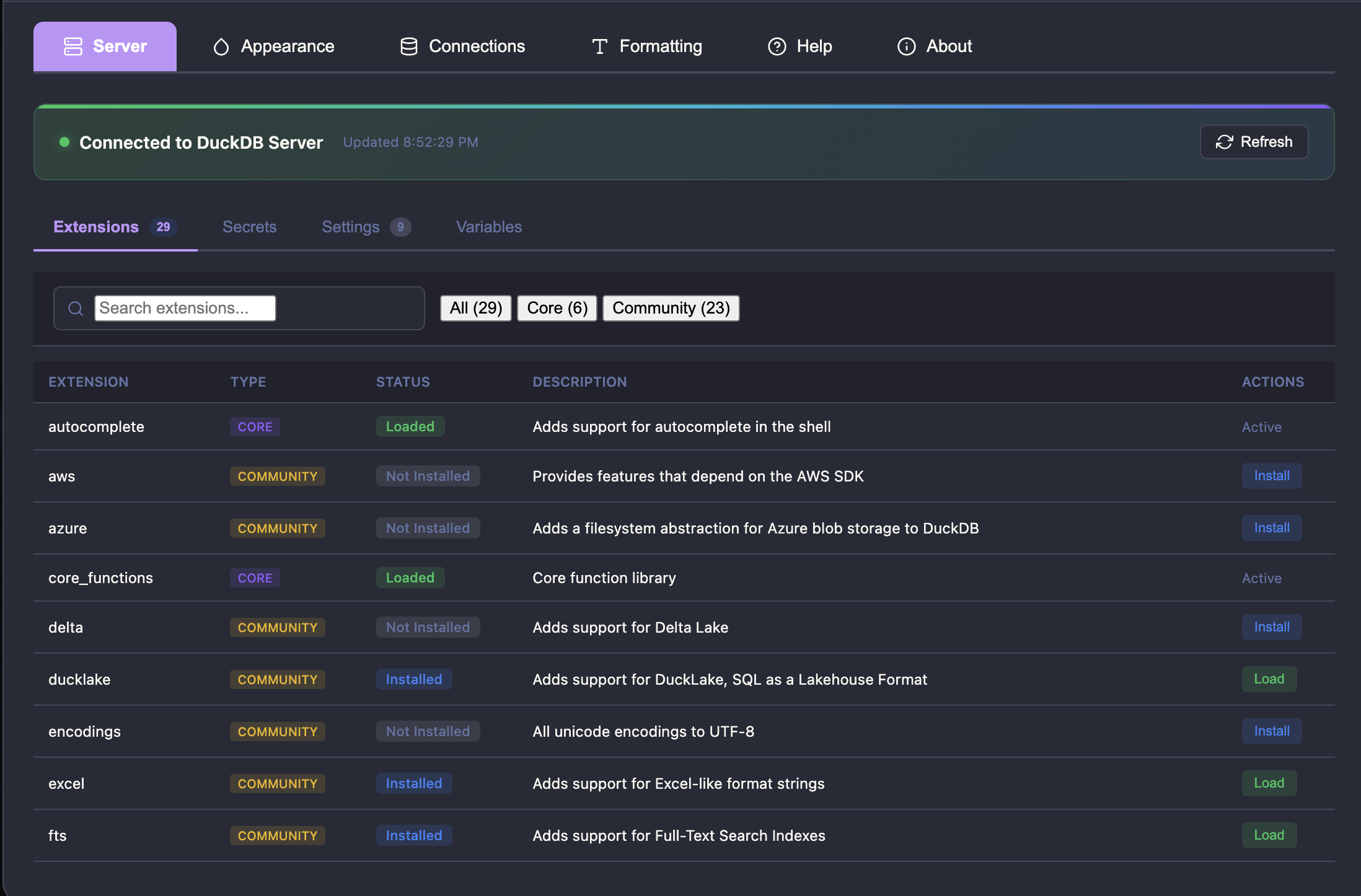
Manage Your DuckDB Server
In Server mode, get full visibility and control over your DuckDB instance.
Browse, install, and load DuckDB extensions
Configure threads, memory limits, temp directory
View configured S3, GCS, Azure credentials
Monitor session variables and state
Ready to query your data?
No signup required. Start querying in seconds.